
CoCM - How to use Diagnosis Codes
Patients may be assigned diagnosis codes in the Mirah platform. There are a few things to know about how diagnosis codes work in the Mirah platform:
- Diagnoses in Mirah correspond with alphanumeric codes (eg: ICD-10) and/or diagnosis names (eg: Major Depressive Disorder, single episode, unspecified).
- Diagnoses codes are specific to an episode of care and must be re-entered for each new enrollment.
- Patients may be given 1 or more diagnosis codes for a given episode of care. Users may designate a primary and secondary diagnosis, if desired.
- The diagnosis list must be configured prior to assigning diagnoses to patients. Only active diagnoses on the institute’s diagnosis list can be assigned to patients.
See here on how to create Diagnosis Codes.
To assign a diagnosis to a patient, navigate to that patient’s detail page and find the Diagnosis window (on the left side of the page):

- Click the Button for Add Diagnosis
- Use the search field to find the required diagnosis– you may search by keyword for the alphanumeric code (eg: ICD 10) or the diagnosis name.
- Select the correct diagnosis from the dropdown list. The designation field may be used to denote the Primary and Secondary diagnosis, if desired. You may enter as many diagnoses as desired for each episode of care.
- If the required diagnosis is not yet in the diagnosis list, you may add it from this window by clicking on the dropdown menu item for “create …”.
- You will then be prompted to create the diagnosis by adding the diagnosis code and/or diagnosis name. Click save to add the diagnosis to your institute’s diagnosis list and to this patient’s record.

- All active diagnoses for a patient are visible on their patient details page in the diagnosis field. Use the action icon to retire the diagnosis as needed.
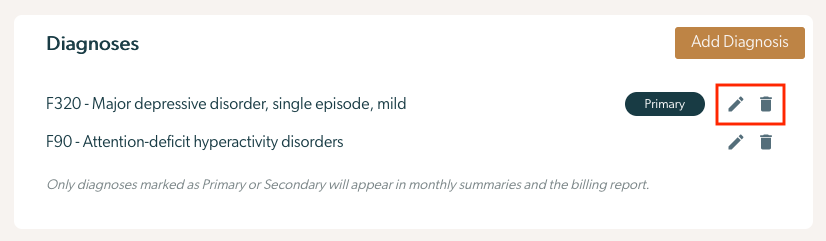
Once you've added diagnoses to a patient, you can edit or remove a diagnosis with these icons:
Editing a diagnosis will bring up a dialog that lets you change its designation:
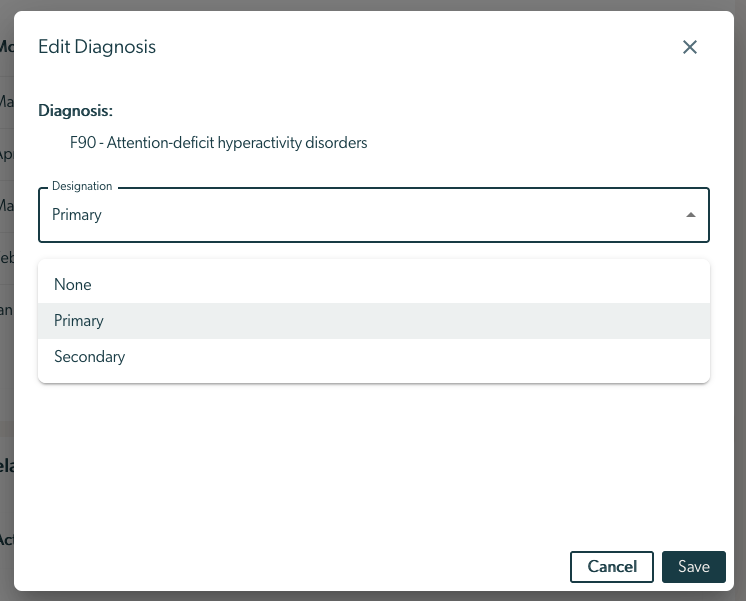
Note that a patient can only have one primary and one secondary diagnosis at a time. If you change a diagnosis to primary or secondary when the patient already has a primary or secondary diagnosis, the previous diagnosis will be automatically changed to a "None" designation.
Diagnoses on the Monthly Billing Report
The primary and secondary diagnosis (if recorded in Mirah) for each patient will automatically be added to the monthly billing report. Diagnoses not specified as None (neither primary or secondary) will not populate on the Monthly Billing Report.
